WiFi vs Non-WiFi Baby Monitor: Which Risk Do You Prefer?
A security-minded breakdown of wifi and non-wifi baby monitors: how each one transmits, what can actually go wrong, and who should buy which in 2026.
By the Ask Versa AI Editorial Team. Ask Versa AI content is AI-assisted and editorially reviewed before publishing; specs and review sentiment are pulled live from Amazon.
Every baby monitor debate eventually becomes an argument between two fears. Fear one: a stranger watching the nursery through a compromised camera. Fear two: being unable to see the nursery at all, from the office or the flight home. WiFi monitors and non-wifi monitors are each the answer to one of those fears, and marketing on both sides quietly pretends the other fear doesn't exist.
This isn't a post about which side is scarier in the abstract. It's about what each design actually does with your feed, drawn from how the technology works, eufy's and HelloBaby's own security guidance, and parents who have been burned either way.
How the two designs actually differ
A non-wifi monitor is a private radio link. The camera and the parent unit talk directly over the 2.4GHz band, usually with frequency-hopping spread spectrum, the same channel-hopping technique Bluetooth uses to dodge interference. There is no router, no account, no cloud, and no address on the internet for anyone to find. HelloBaby's own comparison post is blunt about the consequence: because these monitors never connect to the internet, there's no external path to the feed at all.
A wifi monitor is an IP camera with nursery software. The feed travels from camera to router to cloud service to your phone. That's precisely what buys the superpowers parents want: viewing from anywhere, motion and cry alerts as push notifications, cloud clips. And it's precisely what creates the attack surface. BabyishHub's security writeup calls wifi models the most vulnerable category when strong passwords and firmware updates are skipped, and even eufy, which sells wifi cameras, publishes a guide conceding they're more susceptible than non-wifi models while arguing they can be safe with the right hygiene.
The part neither marketing deck admits
The clean story, "wifi = hackable, radio = safe," is false in both directions.
On the wifi side, the breach stories that make the news are overwhelmingly credential failures: default passwords, reused passwords, abandoned firmware. The fix is boring and it works. A unique password, updates enabled, and two-factor auth closed the door on the majority of real incidents, which is the same checklist any security blog will give you.
On the radio side, the claim of total safety oversells too. A pointed r/Parenting thread on exactly this question includes a parent noting that any monitor can be compromised, even non-wifi ones, since the radio link itself can in principle be intercepted with the right hardware. That's a far higher bar than guessing somebody's password, and it has no web-scale attack surface. But "unhackable" is a marketing word, not an engineering one.
So the honest comparison isn't safe versus unsafe. It's about which failure mode you're choosing, and how much effort each one asks of you.
What wifi actually costs you beyond security
Security gets all the attention, but it's not the only real difference:
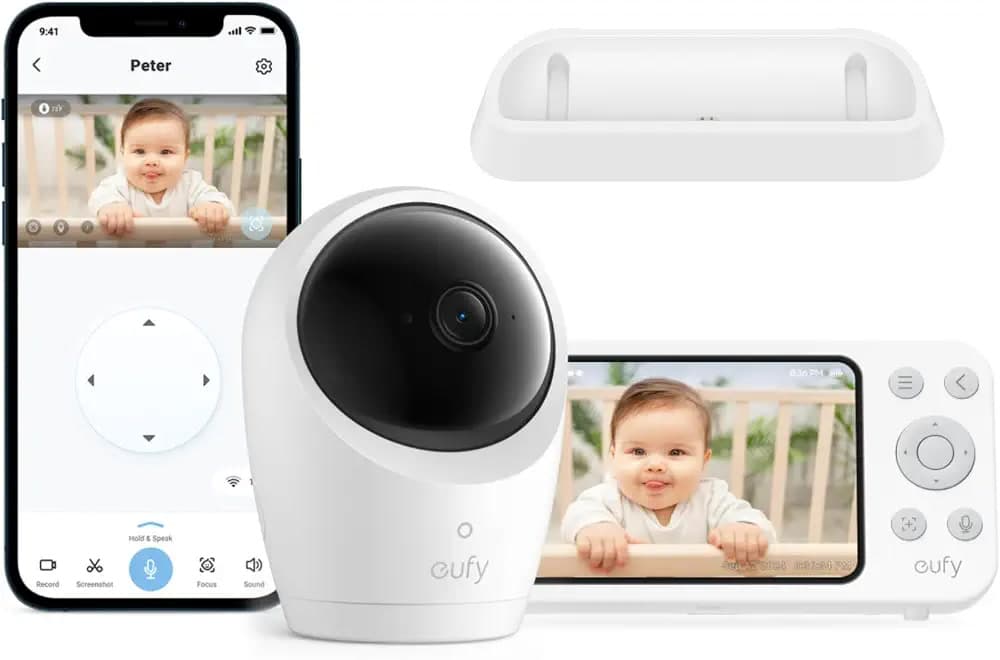
That last row is the whole decision, and it's why hybrid models now exist. The eufy Baby Monitor E20, for example, runs as a local monitor by default and switches to wifi only when you're away, so the nursery feed stays off the internet while you're home and follows you when you leave. If you want both behaviors and one device, this is the category to shop.
So which one should you buy
If your home internet is reliable and you genuinely want nursery access from outside the house, buy a wifi or hybrid monitor, then spend ten minutes on the setup hygiene: unique password, two-factor auth, firmware updates on. That combination puts you ahead of nearly every breached household on record.
If you would never check the camera from outside anyway, wifi buys you nothing but exposure. A non-wifi unit like the eufy E21, C10, or a HelloBaby gives you the same nursery view with no account and no external surface, and it keeps working when the router doesn't.
The one rule worth keeping regardless of side: never buy a wifi monitor for a feature you won't use. Exposure with no benefit is the worst quadrant on the board.
Frequently Asked Questions
Can a non-wifi baby monitor be hacked?
Not over the internet, because it has no internet presence. The radio link between camera and parent unit can in theory be intercepted with specialized equipment, which is a much higher bar than cracking a reused password. No connected-camera class of attack applies.
What is FHSS in baby monitors?
Frequency-hopping spread spectrum: the radio hops between channels many times per second in a pattern only the paired parent unit knows. It's the standard transmission for dedicated non-wifi monitors because it resists both interference and straightforward eavesdropping.
Do wifi baby monitors work when the internet is down?
The local monitor-to-router link may survive a WAN outage, but remote viewing certainly doesn't, and app-dependent models can lose most of their function. If outage coverage matters to you, that's the argument for a radio monitor or a hybrid like the eufy E20 that keeps a local mode.
Are hybrid baby monitors worth it?
They're the pragmatic pick for most families: local radio at home, wifi when traveling, one camera to mount. You pay a modest premium over a pure radio unit and get to leave the internet path switched off unless a trip actually needs it.
If you've narrowed it to two models, run them through Versa AI to see how their owner reviews diverge before you commit.
Shop smarter with Ask Versa AI
Get occasional product-comparison tips and new features as they ship. No spam.