Best 3D Printer for Beginners in 2026: 5 Tested Picks
From $200 to $1,700, the beginner 3D printers actually worth buying in 2026, what each tier gets you, and the one feature you should never compromise.
By the Ask Versa AI Editorial Team. Ask Versa AI content is AI-assisted and editorially reviewed before publishing; specs and review sentiment are pulled live from Amazon.
Five years ago, recommending a beginner 3D printer meant warning you about bed leveling, first-layer failures, and a weekend of calibration. In 2026 that paragraph is obsolete: every machine on this list auto-calibrates, and the difference between tiers is now mostly build volume, speed, and multi-color ambition. That shifts the buying question from "will it work?" to "how much printer do you actually need?"
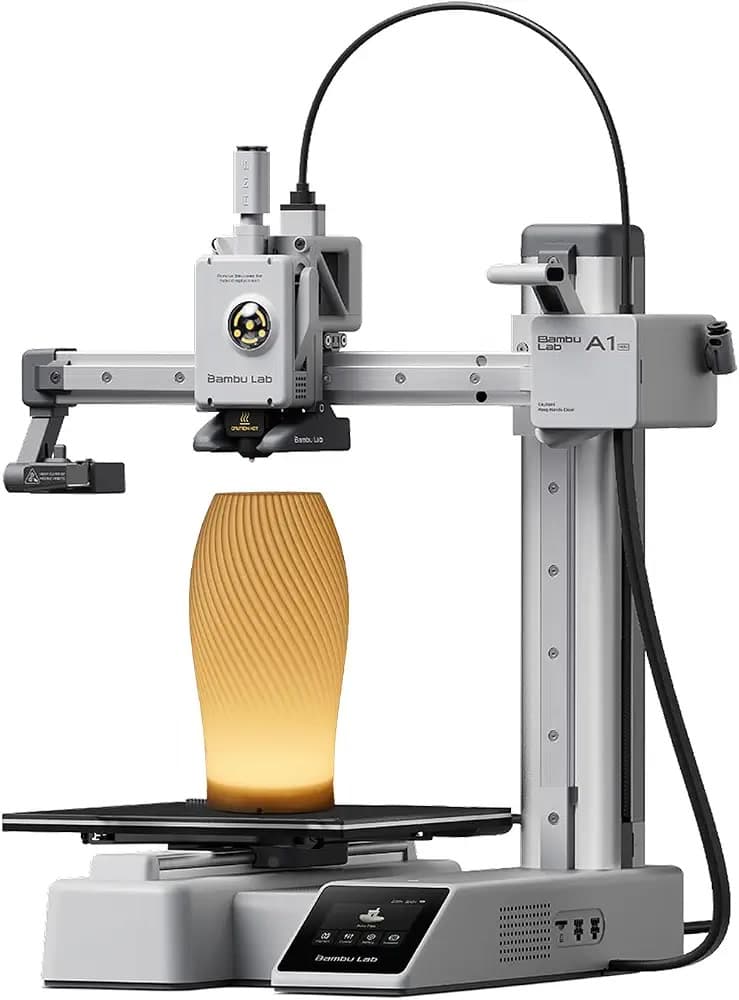
Wirecutter's current pick, the Bambu Lab A1 mini, is described as the fastest and easiest-to-use printer they've found that still fits on a desk, and PCMag lands the same way: top-notch for beginners at an affordable price. Start there, then decide which tier you're really in.
Tier one: the $200-330 starter
Bambu Lab A1 mini, $299 list (often less on sale). The default answer. 3dprintgearlab's 2026 breakdown credits it with full auto-calibration of bed leveling, flow rate, and vibration, "so your first print usually succeeds with no manual setup." The 180mm build cube is small, but for keychains, brackets, miniatures, and most household fixes, it's plenty, and the ≤48dB rating keeps it desk-compatible. One decision to make at checkout: the Combo adds the AMS lite multi-material unit for $449 total, per Bambu's US store pricing. Multi-color printing is delightful, but for a first printer it's an accessory, not a requirement. Buy the standalone, learn the craft, add the AMS later if color pulls you.
Creality Ender 3 V3 SE, under $200. The budget rung, and print-technology.com's pick for exactly one reason: the largest community. When your print fails at midnight, someone has already posted your exact failure and its fix. The trade is speed and polish; you're buying the cheapest reliable on-ramp, not a fast machine.
Tier two: the $400-700 sweet spot
Bambu Lab A1 (full size). Same architecture as the mini with a bigger build plate, for buyers who already know they'll print large items: cosplay props, storage solutions, big functional parts. It accepts the full multi-color system too. If the budget stretches here without strain, it removes the "will it fit?" ceiling entirely.
Creality K2 Plus / Bambu P1S class (~$600-700). Enclosed machines. This tier matters for one specific buyer: people printing engineering filaments like ABS or ASA, which want a heated, enclosed chamber. For PLA-only beginners, an enclosure buys nothing. Skip upward only when the material list demands it.
Tier three: not for beginners, know it exists
Above ~$1,500 sits Bambu's flagship territory: the H2D line runs $1,749-1,999 per OriginalPricing's 2026 data, with the dual-nozzle X2D above that. These are workshop machines. Listed here so you recognize the ceiling, not as a destination; nothing in your first year of printing needs them.
The one feature you should never compromise
Auto-calibration. It's the entire difference between 2026 and the bad old days, and it's now standard on every machine above ~$200. If a listing doesn't advertise automatic bed leveling and flow compensation, you're buying a hobby-adjacent troubleshooting project, not a printer. 3dprintgearlab's phrasing is the standard to hold: your first print should usually succeed with no manual setup.
Frequently Asked Questions
Is 3D printing hard for beginners?
Not anymore. With auto-calibrating machines, the workflow is: find a model on a library like MakerWorld, slice with one click, print. The learning curve moved from hardware setup to design literacy, and free model libraries mean you can print for months before needing any CAD skills.
How much should I spend on a first 3D printer?
$200-350 is the honest answer for most people. That covers the A1 mini class with money left for filament. Spending more before your first spool is finished is speculative; you don't yet know whether you print big things, colorful things, or engineering things.
Bambu A1 mini or Ender 3 V3 SE as a first printer?
The A1 mini if the goal is printing things; the Ender if the goal includes learning the machine itself. The Creality's giant community is genuinely valuable for tinkerers, while the Bambu's calibration automation is genuinely valuable for everyone else. Neither is wrong.
Do I need the AMS lite combo as a beginner?
No. Multi-color printing is a wonderful second-year purchase and an annoying first-week one. Start single-material; the combo can come later, and Bambu sells it separately.
Shortlisted two printers? Versa AI will put their specs and owner sentiment side by side before you spend.
Shop smarter with Ask Versa AI
Get occasional product-comparison tips and new features as they ship. No spam.