Snapmaker U1 vs Bambu Lab P2S: Two Ways to Print in Color
The Snapmaker U1 swaps four preheated toolheads in 5 seconds. The Bambu Lab P2S feeds four spools through one nozzle. Same price, different color physics.
By the Ask Versa AI Editorial Team. Ask Versa AI content is AI-assisted and editorially reviewed before publishing; specs and review sentiment are pulled live from Amazon.
The Snapmaker U1 arrived with the loudest receipt in the category: $20.6 million from 20,680 Kickstarter backers by July 2026, the highest-funded 3D printer in the platform's history, and more than 100,000 units shipped to over 80 countries since. The Bambu Lab P2S arrived the opposite way, as the quiet successor to the P1S, the enclosed CoreXY that normalized fast, reliable, closed-frame printing for home workshops. Bambu calls it "Built on a Legend," and the legend is real; the P1S spent years as the default recommendation in the mid tier, and our 3D printer buying guide still points budget buyers at its clearance pricing.
Put the two current machines side by side and the spec sheets sit close. Both are CoreXY. Both touch $650-700 during Black Friday week (November 2026: the U1 opens at $699 on Snapmaker's own sale, the P2S at $649 against a typical $749). Both watch your prints with a camera and AI, both recover from power cuts, both level themselves. On paper this looks like a coin flip.
It is not, because the two machines disagree about something more basic than any spec row: where the color lives. The U1 carries four independent, independently preheated toolheads and swaps the whole head between materials in 5 seconds. The P2S carries one toolhead and swaps the filament through it, purging whatever was melting in the nozzle out into a purge tower every single time the color changes. That single engineering choice drives the waste you pay for, the materials you can run, and which printer belongs on your desk. The rest of this comparison is mostly arithmetic attached to it.
The Specs Side by Side
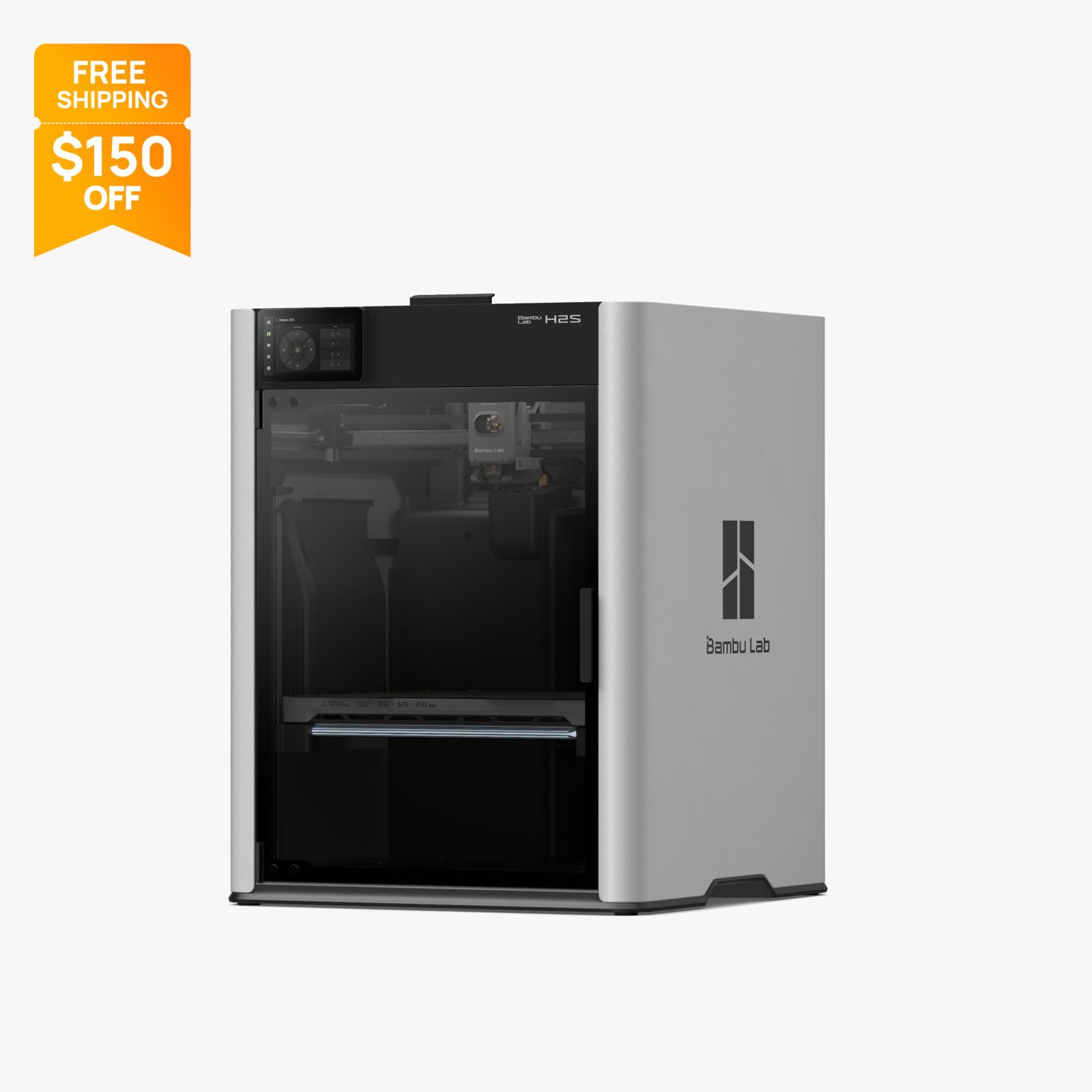
| Spec | Snapmaker U1 | Bambu Lab P2S |
|---|---|---|
| Design | Tool changer, 4 independent preheated toolheads | Enclosed CoreXY, single toolhead |
| Frame | CoreXY, all-metal frame, carbon fiber X axis | CoreXY, fully enclosed chamber |
| Build volume | 270×270×270 mm | 256×256×256 mm |
| Max toolhead speed | 500 mm/s | 600 mm/s, up to 20,000 mm/s² |
| Nozzle | 4 dedicated heads, SnapSwap 5 s change | 300 °C, hardened steel, 0.4 mm stock (0.2/0.4/0.6/0.8) |
| Multicolor system | Native, four resident heads, no purge | AMS 2 Pro (combo), 4 spools, purge per change |
| Color-change waste | Near zero | 10-30% overhead on color-heavy prints |
| Filament handling | 4 resident spools, auto feed, Backup Mode | AMS 2 Pro with active venting drying, filament cutter |
| Chamber | Open frame; optional Top Cover for ABS/ASA | Enclosed; activated carbon, VOC, and particle filtration |
| Engineering materials | PLA, PETG, TPU, PVA support, PAHT-CF; ASA/PA with Top Cover | ABS, ASA, PC, PA, PLA-CF, PA6-CF, PPA-CF, PET-CF |
| Monitoring | Camera + AI: spaghetti, runout, empty, power loss; a dozen+ sensors | 1920×1080 30 fps camera, AI error detection, door, runout, tangle sensors |
| Screen | 3.5-inch color touch | 5-inch 854×480 touch, 8 GB eMMC |
| Slicer | Snapmaker Orca, Full Spectrum color mixing | Bambu Studio, Bambu Handy, third-party slicers |
| Price (Nov 2026) | From $699, Black Friday sale | $649 (typical $749); Combo with AMS 2 Pro selected at checkout |
Two rows in that table decide the purchase, and they point in opposite directions. The multicolor row is the U1's whole reason to exist. The materials row is the P2S's. Everything else is close enough that it should not swing your decision, which is exactly why the two machines confuse shoppers: the spec table looks like a tie until you price what a color change costs on each architecture.
What a Color Change Costs You
This is the section to read twice, because it is the real comparison.
A single-nozzle system cannot have two colors in it at once. When the P2S switches from black to white, it has to push every last bit of black out of the melt zone and then flush white until the black stops bleeding through, and all of that material lands in a purge block that goes in the bin. Owner communities, the AMS threads on r/3Dprinting among them, consistently report 10-30% filament overhead on multicolor prints, and the percentage scales with how often your model alternates colors. We ran this math in detail in the AMS cost breakdown; the short version is that a heavily color-switched 200 g print can shed 20-60 g of plastic, at roughly $20 per kilogram of PLA, on every single copy of the part.
The U1's architecture deletes that line item. Each color lives permanently in its own toolhead, preheated and parked on the rail. A change means the carriage drops one head and picks up another in 5 seconds (Snapmaker calls it SnapSwap), and the material that was printing continues printing in the next head. There is no melt zone to flush, so there is no purge tower, and the filament you bought is the filament that becomes your print. Snapmaker's own durability claims lean on exactly this mechanism: one million head-swap cycles in lab testing with zero mechanical failures, and 5,238 hours of community-run time on shipped units. Those numbers came out of the need to prove a tool changer can survive consumer duty cycles, and so far they hold.
There is a second, quieter cost the purge math hides: time. A purge structure prints at normal speed, so a model that swaps colors every layer can run about a third longer than its single-color twin on an AMS-fed machine. The U1 pays 5 seconds per swap instead. On a 14-hour multicolor print with hundreds of swaps, that difference compounds into hours, not minutes.
The honest counterweight is that AMS 2 Pro is not just a color feeder. Its active venting filament drying keeps spools dry while they sit in the unit, which matters enormously for PETG, TPU, and nylons in a humid room. Damp filament prints with stringing and popping, and a dry box is otherwise an extra purchase and an extra habit. The U1 keeps its four spools resident and auto-fed with a Backup Mode that switches to a second spool when one runs out mid-print, but Snapmaker's spec sheet does not claim active drying in the base feed system. If your workshop humidity is the enemy, that is a real point to Bambu.
The U1 Argument: Color With No Trash Tax
If multicolor is the reason you are buying a printer this year, the U1 is the strongest case at the price. Four resident heads do not just eliminate purge waste; they change what is practical to print. A model with black body, white text, and red accents printed on an AMS needs the purge tower budgeted like a fourth material. The same model on the U1 is just... three materials, loaded, done. Snapmaker's slicer (Snapmaker Orca, built on Orca Slicer) adds a Full Spectrum mode that blends colors in the plan itself, which is a level of color thinking that single-nozzle systems physically cannot offer.
The multi-material angle is bigger than color. Because each head is dedicated, you can park one with water-soluble PVA and print real dissolvable supports under a PETG part, with no flush sequences between support and model material. That is a capability that used to require industrial machines, and it arrives here at $699. The supported list spans PLA, PETG, TPU (including TPU 95A HF), and PAHT-CF, and adding the optional Top Cover unlocks ASA and PA for weatherable and structural work.
The frame deserves one paragraph because it explains the print quality. All-metal construction with a carbon fiber X axis, moving-toolhead CoreXY kinematics, automatic mesh leveling, and a monitoring stack that covers spaghetti detection, filament runout, empty extrusion, a mis-picked toolhead, a missing build plate, and power-loss recovery, all watched by more than a dozen sensors. The awards on the 2026 circuit (Product Design 2026 Winner, Editors' Choice 2026) and the 100,000-unit install base mean the toolchanger bet has survived contact with real buyers, which was the legitimate fear about a first-generation mechanism.
Where the U1 gives ground: it is an open frame out of the box, so ABS and ASA need the Top Cover accessory rather than the enclosed chamber the P2S ships with. The 3.5-inch screen is smaller than Bambu's 5-inch panel. And the ecosystem is younger, fewer third-party profiles, fewer years of tuned community settings, though Snapmaker ships open-source firmware with its GitHub open, which the tinkerer crowd weighs heavily.
The P2S Argument: One Nozzle, Every Material
The P2S wins a different game. Its chamber is sealed and filtered from the factory, with activated carbon, VOC, and particulate filtration, and the hotend runs to 300 °C with a hardened steel nozzle and hardened extruder gears stock. Feed it the hard stuff. ABS and ASA for outdoor and automotive parts, polycarbonate for real load-bearing work, and the carbon-filled family (PLA-CF, PA6-CF, PPA-CF, PET-CF) that the Bambu effect generation of machines made practical at home. The U1 can reach PAHT-CF and, with the Top Cover, ASA. The P2S reaches all of it in the box, with a 110 °C bed holding warp-prone materials flat.
The details show a machine refined rather than invented. A built-in filament cutter halves wasted purge by cutting the filament close before a retraction change rather than pushing it all the way back through the tube. The camera streams 1920×1080 at 30 fps with AI error detection on top, and the door sensor, runout sensors, and tangle detection each kill a distinct failure mode. Power-loss resume is standard. The 5-inch touchscreen with 8 GB of storage runs the printer standalone, and Bambu Studio (plus Bambu Handy for phone control, plus third-party slicer support) is the most mature consumer software stack in the hobby.
The ecosystem argument is real and boring in the way true things are boring. MakerWorld model profiles, years of community-tuned settings, spare parts availability, and a two-year warranty with 30-day returns and 30-day price protection. When a first printer goes wrong at 9 p.m. on a Sunday, the size of the community around it is the feature that saves the hobby. The P1S built that community; the P2S inherits it. Our deals tracking has the P2S Combo with AMS 2 Pro around $769 during the Black Friday window, and the full tier-by-tier sale picture is in the 3D printer Black Friday roundup.
The Near-Ties: Speed, Size, and Software
The headline numbers differ more than the machines do. The P2S quotes 600 mm/s and 20,000 mm/s² against the U1's 500 mm/s, a 20% gap on paper that shrinks to nothing in practice, because both machines spend most of their time far below the cap. Real print speed is limited by how fast melted plastic can be laid down without stringing and curling, which is a materials problem, not a marketing number. Buy on speed difference here and you are buying a decimal point.
Build volume is nearly as close: 270×270×270 mm against 256×256×256 mm. The U1's extra 14 mm per axis is nice for oversized cosplay parts and full-width plates, but both are mid-size beds, and neither crosses into the large-format class where the QIDI Plus 5 faces the P2S Combo with 320 mm. If you are choosing on volume, you are probably choosing neither of these.
Software splits on philosophy. Bambu Studio is polished and closed, with the largest profile library in the hobby. Snapmaker Orca is an Orca Slicer fork, which means it inherits one of the best open slicer codebases, plus the Full Spectrum color-mixing planner, and Snapmaker keeps its firmware open on GitHub. If you want an appliance, Bambu's stack is smoother on day one. If you want to peek under the hood, Snapmaker hands you the hood.
Who Should Buy Which
Since you are reading a comparison of two multicolor-capable printers, assume color matters to you, and let the volume of color decide.
If your print queue is full of multicolor models (figurines, signs, helmets with panels, anything off MakerWorld or Printables with three or more colors), buy the U1 and do not agonize. At $699 with four heads included, it undercuts the true multicolor P2S (the ~$769 Combo) while deleting the 10-30% purge tax on every print those machines share, and it prints water-soluble supports in the same job. The Kickstarter-scale install base and the million-cycle swap testing mean the mechanism is no longer a gamble. Multicolor-first buyers are exactly who those 20,680 backers were.
Buy the P2S instead when multicolor is a sometimes-activity and the rest of your printing is serious material work. The enclosed, filtered chamber with a 300 °C hotend covers ABS through carbon-filled nylons with nothing extra to buy, AMS 2 Pro dries your filament while it feeds, and the ecosystem means every problem you hit at 11 p.m. has a forum answer and a spare part. That combination, at $649, is the most complete all-rounder package in the mid tier, and it is a better single-color engineering printer than the U1 is.
The trap to avoid is buying the P2S base unit at $649 while telling yourself multicolor comes later. The AMS 2 Pro is the multicolor; without it the P2S is an excellent single-color machine, and the Combo math is the honest comparison against the U1. Budget the complete tool, not the teaser price.
Frequently Asked Questions
Does the Snapmaker U1 waste filament like an AMS system?
No. Each of the U1's four toolheads holds its own material permanently, so a color change swaps the head in 5 seconds instead of purging the old color out of a shared nozzle. There is no purge tower. Single-nozzle AMS-style systems, including the P2S with AMS 2 Pro, carry a 10-30% filament overhead on color-heavy prints according to owner reports.
Can the Bambu Lab P2S print ABS, ASA, and carbon fiber filaments?
Yes, out of the box. The P2S ships fully enclosed with activated carbon, VOC, and particulate filtration, a 300 °C hardened hotend, and a 110 °C bed. Its supported list includes ABS, ASA, PC, PA, and the carbon-filled PLA-CF, PA6-CF, PPA-CF, and PET-CF families. The U1 reaches PAHT-CF natively but needs the optional Top Cover for ASA and PA.
Is 500 mm/s noticeably slower than 600 mm/s?
Not in practice. Both figures are maximum toolhead speeds that real prints touch only briefly; actual pace is limited by how fast each material can be extruded cleanly. The 100 mm/s gap is a spec-sheet difference, not a waiting-around-the-printer difference.
Can the Snapmaker U1 print ABS?
With the optional Top Cover, yes. The cover encloses the build volume enough for ABS and ASA work. Without it, the U1 is an open-frame machine best suited to PLA, PETG, TPU, PVA supports, and PAHT-CF. If ABS is a primary material rather than an occasional one, the P2S's factory-sealed, filtered chamber is the more purpose-built answer.
Which is the better first multicolor 3D printer?
If multicolor output is the point of the purchase, the U1: four heads are included at $699, color changes cost 5 seconds and zero grams, and multi-material prints with dissolvable supports work in one job. If multicolor is secondary to printing engineering materials reliably, the P2S, ideally as the Combo with AMS 2 Pro so the multicolor capability is actually in the box.
Does the AMS 2 Pro dry filament while printing?
Yes. The AMS 2 Pro includes active venting filament drying, which keeps resident spools dry during storage and prints. That is a genuine advantage over feed systems without active drying, especially for PETG, TPU, and nylon in humid environments.
One last habit worth keeping during sale season: both machines' prices move week to week, and every number above is a November 2026 snapshot. Paste the exact two listings you are pricing into Versa AI and it will read the current owner feedback and spec deltas on both before you commit the money.
Shop smarter with Ask Versa AI
Get occasional product-comparison tips and new features as they ship. No spam.