Entina Tina2C vs Creality Ender 3 V3 SE: Which Is Better?
Entina Tina2C
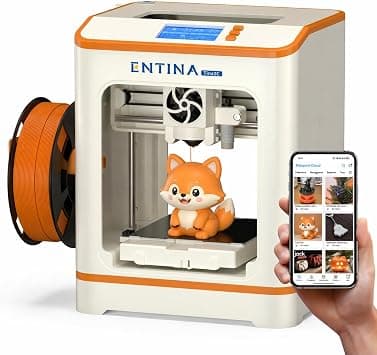
335 reviews
Watching $199.99 — we'll email you the moment it drops
Creality Ender 3 V3 SE
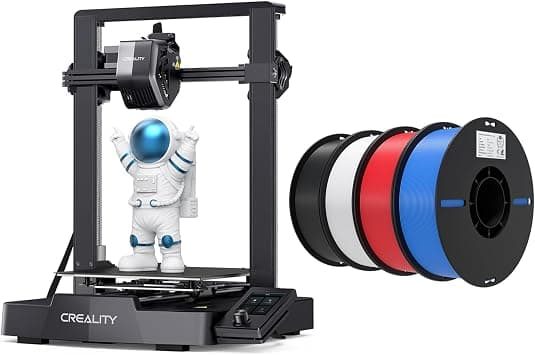
22 reviews
Watching $201.74 — we'll email you the moment it drops
Our pick: Entina Tina2C. If you want an assembled, kid-friendly printer with app control and a small footprint for STEM learning, choose the Tina2C; if you need faster speeds, a larger build volume and PLA/TPU/PETG capability for real hobby projects, go with the Ender 3 V3 SE bundle.
The real differences
Stripped of marketing. Just facts.
| Spec | Entina Tina2C 3D Printer... | Creality Ender 3 V3... | Note |
|---|---|---|---|
| Target User / Skill Level | Kids, first-time beginners, classrooms (guided app setup) | Hobbyists and makers, including owners upgrading from earlier Ender 3 models | A is purpose-built for novices; B assumes some familiarity with FDM printing workflows |
| Build Volume | 3.9 × 3.9 × 3.9 in (mini, ~100 mm cube class) | Full-size desktop platform (Ender 3 series class, roughly 220 × 220 × 250 mm) | B can print large functional parts; A is limited to small models and trinkets |
| Maximum Print Speed | Not specified; standard entry-level speeds suited to small models | 250 mm/s with 2500 mm/s² acceleration (claims ~73% time saving) | |
| Extruder / Material Support | Standard direct-drive printhead, primarily PLA-type filaments | "Sprite" full-metal dual-gear direct extruder, works with PLA, TPU and PETG | |
| Leveling & First-Layer Setup | Intelligent auto-leveling plus power-loss recovery | CR Touch auto-leveling plus strain sensor for automatic Z-offset | Both remove most manual bed tuning; B adds automatic Z-offset |
| Frame Stability & Accuracy | Compact lightweight open frame, fixed single-axis motion | Dual Z-axis lead screws and Y-axis dual 8 mm steel linear shafts to reduce wobble and deviation | B's stiffer motion system favors accuracy on taller, faster prints |
| Connectivity & Ecosystem | 2.4G WiFi + TF card offline mode, Poloprint Cloud app with AI photo-to-print, 3000+ model library, 20+ creative modules and STEM courses | Standalone operation (no WiFi/app printing); slicing via desktop software | A offers the far richer app, content and remote-control experience |
| Assembly & Setup Time | Fully assembled, ready to print in as fast as 8 minutes via guided app | Kit-style bundle requiring partial assembly and manual setup steps | |
| Home Safety & Noise | Compact rounded body, low-noise operation, integrated LED lighting; home/classroom oriented | Standard open-frame desktop design, no low-noise or child-safety positioning | A is better suited to shared living spaces and kids' rooms |
| Included Accessories | Printer only (models and courses delivered through the app) | Bundled with 4 PLA filament spools (black, white, red, blue) | B includes consumables; A does not mention any bundled filament |
Kids, first-time beginners, classrooms (guided app setup)
Hobbyists and makers, including owners upgrading from earlier Ender 3 models
3.9 × 3.9 × 3.9 in (mini, ~100 mm cube class)
Full-size desktop platform (Ender 3 series class, roughly 220 × 220 × 250 mm)
Not specified; standard entry-level speeds suited to small models
250 mm/s with 2500 mm/s² acceleration (claims ~73% time saving)
Standard direct-drive printhead, primarily PLA-type filaments
"Sprite" full-metal dual-gear direct extruder, works with PLA, TPU and PETG
Intelligent auto-leveling plus power-loss recovery
CR Touch auto-leveling plus strain sensor for automatic Z-offset
Compact lightweight open frame, fixed single-axis motion
Dual Z-axis lead screws and Y-axis dual 8 mm steel linear shafts to reduce wobble and deviation
2.4G WiFi + TF card offline mode, Poloprint Cloud app with AI photo-to-print, 3000+ model library, 20+ creative modules and STEM courses
Standalone operation (no WiFi/app printing); slicing via desktop software
Fully assembled, ready to print in as fast as 8 minutes via guided app
Kit-style bundle requiring partial assembly and manual setup steps
Compact rounded body, low-noise operation, integrated LED lighting; home/classroom oriented
Standard open-frame desktop design, no low-noise or child-safety positioning
Printer only (models and courses delivered through the app)
Bundled with 4 PLA filament spools (black, white, red, blue)
What real buyers say
From 200+ reviews. Filtered for honesty.
Entina Tina2C 3D Printer for Kids & Beginners, Fully Assembled Starter Mini 3D Printer, Start in 8 Mins, App & WiFi Control, Auto Leveling, 3000+ Model Library, 20+ Creative DIY Modules for STEM, Home
Excellent beginner/starter printer that is easy for newcomers to learn on
14+ people said this
Children genuinely enjoy using it and stay engaged with it for weeks
9+ people said this
Quick, simple setup with intuitive app and video tutorials
7+ people said this
Quiet operation, suitable for use around the house
3+ people said this
Small build volume limits what can be printed; users note they will move to a bigger printer afterward
2+ people complained
Best results require research and manual adjustments/tuning
1+ people complained
Creality Ender 3 V3 SE 3D Printer Bundle with PLA Filament 4 Packs(Black+White+Red+Blue)
High-speed printing with strong acceleration for much faster builds
2+ people said this
CR Touch auto-leveling and auto Z-offset make setup largely hands-off
2+ people said this
Dual Z-axis and Y-axis linear shafts provide stable, accurate prints
1+ people said this
Bundle includes four PLA filament spools in assorted colors
1+ people said this
No WiFi or app-based printing; operation and slicing are desktop/offline only
1+ people complained
Larger open-frame design takes up more space and is less child-oriented than mini printers
1+ people complained
Requires partial assembly and some printing experience to get the most out of it
1+ people complained
The verdict
Watching $199.99 — we'll email you the moment it drops
Our pick: Entina Tina2C. If you want an assembled, kid-friendly printer with app control and a small footprint for STEM learning, choose the Tina2C; if you need faster speeds, a larger build volume and PLA/TPU/PETG capability for real hobby projects, go with the Ender 3 V3 SE bundle.
Who it’s for
Different needs, different winnerBased on 357 real buyer reviews + 10 side-by-side specs.
Each product on its own
Only researching one of these? Here is the standalone picture for each: the key specifications and what verified Amazon reviewers keep repeating, without the head-to-head framing.
Entina Tina2C
4.3 / 5 · 335 Amazon ratings
Owners like Excellent beginner/starter printer that is easy for newcomers to learn on (14 mentions)
Owners like Children genuinely enjoy using it and stay engaged with it for weeks (9 mentions)
Common complaint: Small build volume limits what can be printed; users note they will move to a bigger printer afterward (2 mentions)
Creality Ender 3 V3 SE
4.9 / 5 · 22 Amazon ratings
Owners like High-speed printing with strong acceleration for much faster builds (2 mentions)
Owners like CR Touch auto-leveling and auto Z-offset make setup largely hands-off (2 mentions)
Common complaint: No WiFi or app-based printing; operation and slicing are desktop/offline only (1 mentions)
Compare products without leaving Amazon
Install the free Ask Versa AI extension — compare any two products from any page, right-click for a verdict. Chrome, Edge, Brave & Firefox.
Get the extensionFrequently asked questions
Which is better, Entina Tina2C or Creality Ender 3 V3 SE?
If you want an assembled, kid-friendly printer with app control and a small footprint for STEM learning, choose the Tina2C; if you need faster speeds, a larger build volume and PLA/TPU/PETG capability for real hobby projects, go with the Ender 3 V3 SE bundle.
What's the difference between Entina Tina2C and Creality Ender 3 V3 SE?
The key differences: Build Volume — Entina Tina2C: 3.9 × 3.9 × 3.9 in (mini, ~100 mm cube class), Creality Ender 3 V3 SE: Full-size desktop platform (Ender 3 series class, roughly 220 × 220 × 250 mm) (B can print large functional parts; A is limited to small models and trinkets); Maximum Print Speed — Entina Tina2C: Not specified; standard entry-level speeds suited to small models, Creality Ender 3 V3 SE: 250 mm/s with 2500 mm/s² acceleration (claims ~73% time saving); Extruder / Material Support — Entina Tina2C: Standard direct-drive printhead, primarily PLA-type filaments, Creality Ender 3 V3 SE: "Sprite" full-metal dual-gear direct extruder, works with PLA, TPU and PETG; Frame Stability & Accuracy — Entina Tina2C: Compact lightweight open frame, fixed single-axis motion, Creality Ender 3 V3 SE: Dual Z-axis lead screws and Y-axis dual 8 mm steel linear shafts to reduce wobble and deviation (B's stiffer motion system favors accuracy on taller, faster prints).
Which is better value, Entina Tina2C or Creality Ender 3 V3 SE?
Across the specs we compared, Entina Tina2C comes out ahead on 3 and Creality Ender 3 V3 SE on 5. The better value depends on which of those wins matter most for how you'll use it — check live pricing on Amazon and weigh it against the pros and cons above.
Is the Entina Tina2C worth it?
Reviewers most often highlight: "Excellent beginner/starter printer that is easy for newcomers to learn on." The most common complaint: "Small build volume limits what can be printed; users note they will move to a bigger printer afterward." Weigh that against the Creality Ender 3 V3 SE using the full pros and cons above to decide.
Is the Creality Ender 3 V3 SE worth it?
Reviewers most often highlight: "High-speed printing with strong acceleration for much faster builds." The most common complaint: "No WiFi or app-based printing; operation and slicing are desktop/offline only." Weigh that against the Entina Tina2C using the full pros and cons above to decide.
What do customers say about the Entina Tina2C?
Beyond the highlights above, reviewers also frequently mention Children genuinely enjoy using it and stay engaged with it for weeks (about 9 mentions), and a recurring complaint is Best results require research and manual adjustments/tuning (about 1 mentions).
What do customers say about the Creality Ender 3 V3 SE?
Beyond the highlights above, reviewers also frequently mention CR Touch auto-leveling and auto Z-offset make setup largely hands-off (about 2 mentions), and a recurring complaint is Larger open-frame design takes up more space and is less child-oriented than mini printers (about 1 mentions).
How is this Entina Tina2C vs Creality Ender 3 V3 SE comparison made?
It's based on AI analysis of 357 Amazon customer reviews (335 for Entina Tina2C, 22 for Creality Ender 3 V3 SE) alongside the full specifications of both products.
Deep dives
Related comparisons
Shop smarter with Ask Versa AI
Get occasional product-comparison tips and new features as they ship. No spam.